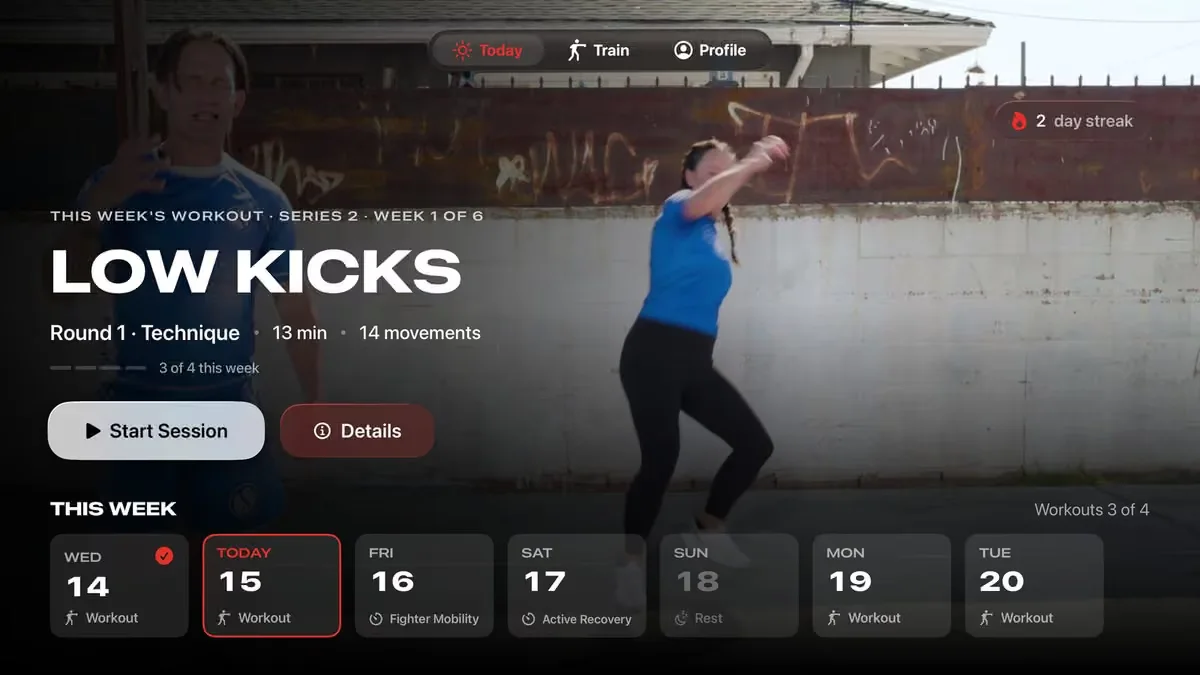
Members who train at home want the coach full size, with the phone free for music or out of the way entirely. That makes the TV the screen where a lot of home workouts happen. Getting your app onto it involves more than a bigger layout, and this guide covers what changes.
Each TV platform is its own app
There is no single TV app that runs everywhere. Each platform has its own software and its own store:
- Apple TV runs tvOS and installs apps from the App Store, with Apple's review process.
- Roku uses its own programming language and its own channel store, with Roku's certification checks.
- Fire TV is built on Android and has Amazon's Appstore.
- Android TV and Google TV devices install from Google Play.
- Samsung smart TVs run Tizen, Samsung's own system, with its own store and review.
Some code can be shared between the Android-based platforms, but each one still needs its own testing, its own store listing and its own updates. Plan your TV apps as separate products that share an account system and a video library.
Signing in without a keyboard
Typing an email and password with a TV remote is slow enough that members give up. The better pattern is to show a code on the TV, have the member scan it with their phone, and sign the TV in once they confirm on the phone.
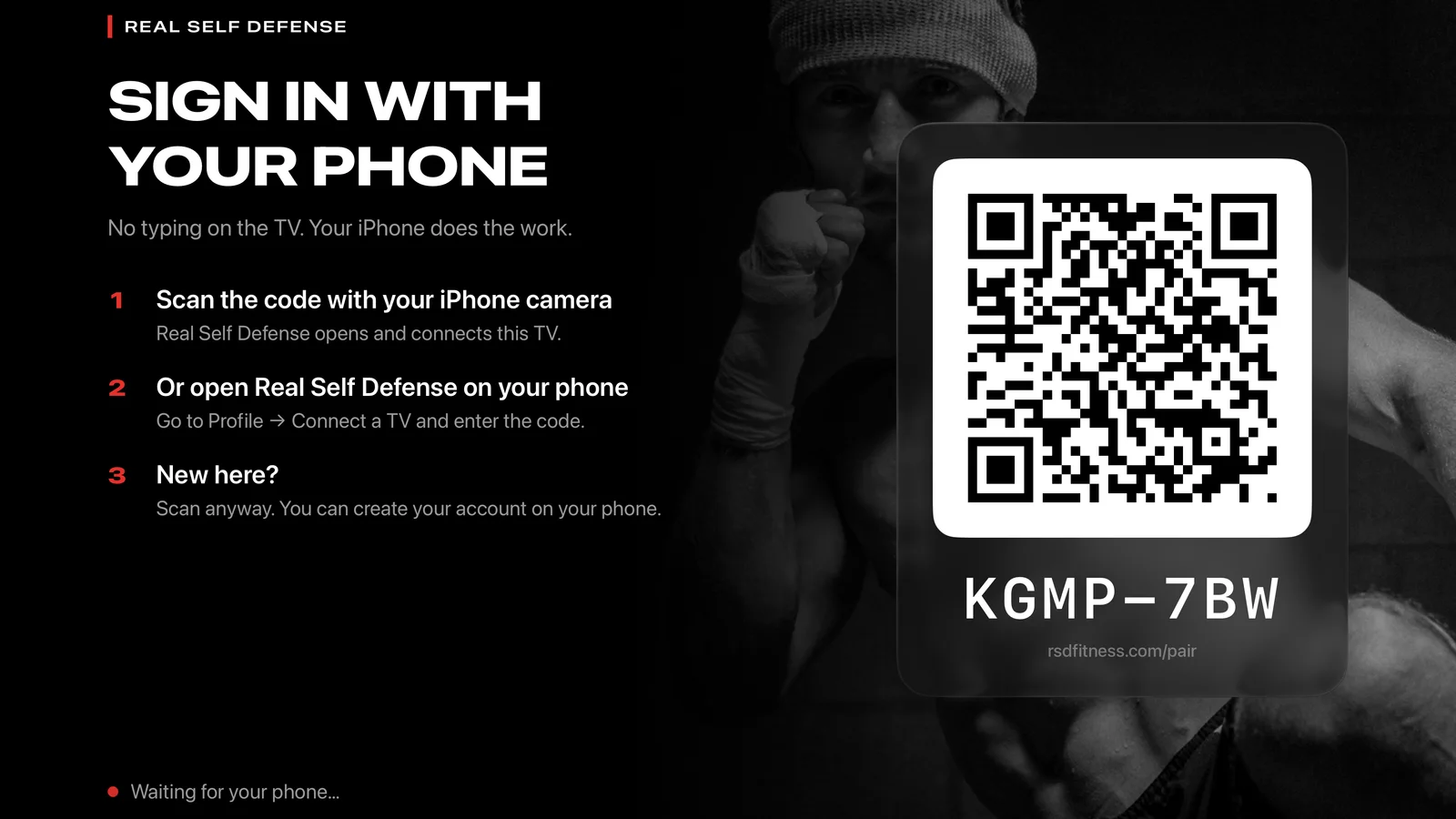
It works the same way on every platform, and it means the member uses the account they already have from your phone app. We explain the member's side of it in our help article on signing in on the TV.
Designing for a remote
A TV is used from across the room with a handful of buttons, so the screens have to change:
- Everything is reached with up, down, left, right and select, so the selected item has to be obvious from the sofa.
- Text has to be readable from three meters away, which means fewer words at larger sizes.
- Fewer screens and shallower menus. Members should reach today's workout in two or three presses.
- There is no hover and no scrolling with a finger, so long pages become rows the remote moves through.
The workout screen matters most. Members glance at it mid-exercise, so the timer, the round count and the next exercise need to be large and in the same place every time, and pause should be one press.
Casting is a fallback
Members can cast or AirPlay a video from your phone app to the TV, and it is worth supporting. It is a weaker experience than a native TV app: the phone has to stay on and nearby, the TV shows only the video without your timers and menus, and the connection drops when the phone locks or rings. Treat casting as the option for members whose TV has no app of yours yet.
Video quality on the big screen
A video that looks fine on a phone can look soft on a 65-inch TV. Record and keep masters at the highest quality you can, and stream with adaptive bitrate, which steps the quality up or down to match each member's connection so the class keeps playing without stopping to buffer.
Captions and clear audio count for more on the TV, since members are often across the room with a fan running. Upload caption files with each video rather than burning text into the picture.
Keeping the phone and TV in step
Members expect to start a program on the phone and continue it on the TV. That needs one account, one workout history and one subscription behind every app. A session finished on the TV should count toward the streak on the phone.
Messages depend on that shared history too. If TV sessions never reach it, a member who trains in the living room five evenings a week looks inactive from the phone's side and can end up getting "we miss you" pushes. In our apps, TV workouts go into the same member history Cortex uses to pick who gets a message and when, so that member's reminders are timed to the evenings they train on the TV.
Subscriptions need the same care. Each TV store has its own rules for selling subscriptions inside the app, and a member who already pays through the iPhone app must be recognized on the Roku without being asked to pay again. Settle how subscriptions are checked across devices before the first TV app is built.
Which TV platform to start with
We release the TV apps together with the phone apps, and one login covers all of them. If your budget means choosing, look at what your members already use. Brands whose members are mostly on iPhone usually see the most use on Apple TV; a broad audience in the US tends to spread across Roku, Fire TV and smart TVs. Asking members in an in-app survey takes a day and settles the question.
You can see the TV and phone apps we build on our apps page.
Common questions
- Do members need a separate subscription for the TV app?
- They shouldn't. A well-built set of apps checks one account across every device, so a member who pays on the phone or the web signs in on the TV and gets the same access.
- Can members just cast workouts from their phone?
- Yes, and it is worth supporting. It shows the video only, keeps the phone tied up, and drops if the phone locks, so most brands with a large home audience add native TV apps as well.
- Is a Samsung TV app the same as an Android TV app?
- No. Samsung smart TVs run Tizen, Samsung's own system, with a separate store and review. Android TV and Google TV devices from other makers install apps from Google Play.
- Can the TV app show live classes?
- Yes. Live classes stream to TV apps the same way on-demand videos do, and the recording can go into the library afterwards so members who missed it can catch up on any device.
Written by
The Click Digital team, which has designed, built and run fitness and health apps since 2012.