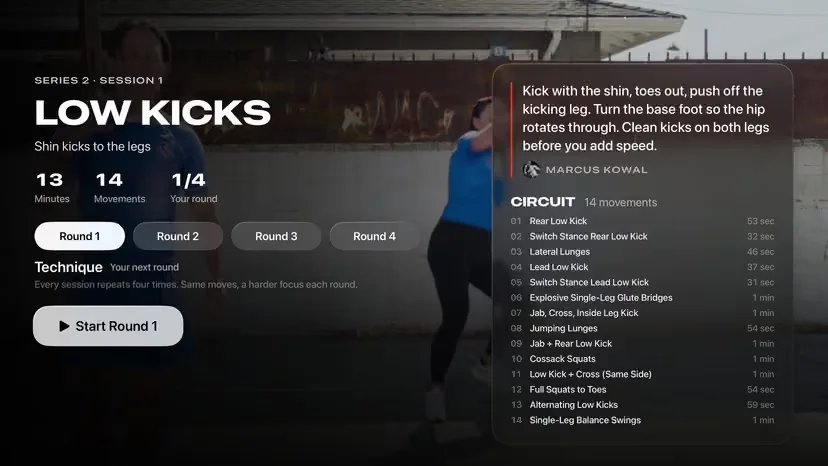
Most fitness brands who call us about leaving Vimeo OTT are happy with the video itself. What they want is the rest of a fitness app: programs with a session for each day, progress and streaks, community, nutrition, and their own name in the app stores. The worry that stops them is the move. Thousands of videos, years of subscribers, and no appetite for a week where members can't train.
Done in the right order, a move can happen with no gap in access at all. This is the order we follow.
Take an inventory first
Before anything moves, write down what you have and where it lives. You'll use this list to check the move at the end.
- The number of videos, their total running time, and how they're grouped into collections or categories
- Which videos are live-class recordings and which were filmed as programs
- Members by plan: monthly, annual, free trial, and any legacy or discounted plans
- Where each subscription is billed: on the web by card, or inside the iPhone, Android or TV apps
- Anything you link to from outside, such as video pages on your website or links in emails
Web subscriptions and app store subscriptions move differently, so the count of each is the most important line on the list.
Plan the new structure before you upload
A move is the best chance you'll get to reorganize. A flat library of 600 videos works as a video service. In a fitness app the same videos become programs, collections and a class schedule.
Decide what the app's main screens show, then sort the library into them. A six-week strength program gets a session for each day in order. Standalone classes get tags for length, equipment, level and coach so members can filter. Live-class recordings go into a library that grows each week.
Titles, descriptions and thumbnails come across with the videos, and this is a good moment to fix the ones that were never quite right.
Move the videos
You shouldn't have to download and re-upload files yourself. The team doing the move should pull the originals at full quality, carry over titles, descriptions and thumbnails, and file each video into the structure you planned. Check a sample from each collection on a phone and a TV once they're in.
Move member accounts and subscriptions
Member accounts carry over by email address, along with each member's plan, renewal date and, where it's available, their watch history. On their first sign-in to the new app, members confirm their email and set a password, and their plan is already there.
Subscriptions need the most care:
- Web subscriptions billed by card through a payment processor can usually continue on the same billing date, depending on which processor holds the cards. Members shouldn't have to re-enter anything.
- App store subscriptions bought inside an iPhone or Android app are held by Apple or Google under the developer account the old app was published with. Whether they can continue in the new app depends on whose account that was, so ask that question before you pick a switch date.
Good to know
Write down the subscriber count for each plan before the move. The same numbers are your test at the end.
Run both services side by side
Keep your current service running until the new apps are approved in every store and the numbers agree. Check member counts by plan, active subscriptions by plan, and video counts by collection against your inventory. Sign in with a few real test accounts on each device type and play something.
Only when everything matches should members be asked to switch. If something doesn't match, your members are still on the old service while you fix it.
Tell members what's changing
Most support questions during a move come from members who weren't told clearly. A short sequence works well:
- A heads-up email a week or two ahead: what's coming, which devices it covers, and that their subscription carries over.
- The switch email on the day, with links to each app store and one line on how to sign in.
- A message inside the old app pointing to the new one, for members who don't read email.
- A reminder a week later to members who haven't signed in to the new app yet.
After the switch
Watch sign-ins on the new apps each day, and read every support question for the first two weeks; patterns show up fast. Members who haven't signed in after a couple of weeks are worth a personal email or a call from a coach. Close the old service when sign-ins have leveled off and the members still on it have been contacted.
In the weeks after the switch, the new app also starts recording each member's training against their program: the sessions they finished or skipped, and the time of day they usually train. Cortex, the AI in our console, uses that history to pick who gets a message, what it says and when it goes out. A member who finishes week two of a program on Sunday can hear about week three around the time they usually train, and a member who has ignored the last three messages can be left alone.
Our team runs this whole process for brands moving to Click Digital. You can see the steps on how a move from Vimeo OTT works, or read about the apps on our Vimeo OTT alternative page.
Common questions
- Will members have to pay again after the move?
- Members with web subscriptions usually carry on with the same billing date. App store subscriptions depend on whose developer account the old app was published under, which is the first thing to check when you plan the move.
- Do we need to re-edit or re-record our videos?
- No. Videos move as they are, at their original quality. Most brands use the move to retitle, regroup and add tags, which needs no new filming.
- Can the old service and the new apps run at the same time?
- Yes, and they should. Keep the old service live until the new apps are approved and the member and subscription counts match, so nobody loses access during the switch.
- What happens to members who never switch?
- Send a reminder after a week and a personal message after two. Members still on the old service when it closes can sign in to the new app with the same email whenever they come back.
Written by
The Click Digital team, which has designed, built and run fitness and health apps since 2012.